SimpleCloud vs. CloudNet v4

Two ways to run a Minecraft network. Compare the tools you use every day, how you extend your network and what you need to maintain.

Daily management

Dashboard and command line

SimpleCloud
Manage the network in your browser or with our CLI. Its commands run directly from your shell and can be used in scripts.
CloudNet v4
Manage the network through CloudNet's interactive console and configuration files. The supplied start script opens the console in screen or tmux. An official web dashboard is not bundled.
SourcesSimpleCloud CLISimpleCloud dashboardCloudNet launcher

Managing the network at the same time

SimpleCloud
Teammates can manage the network at the same time, each through their own CLI or dashboard session. You do not need to share a console or wait for someone else to finish using it.
CloudNet v4
The standard setup uses a shared node console. Multiple people can attach through screen or tmux, but they do not get separate command prompts. You need to coordinate who types so you do not interfere with each other's commands. The optional REST module supports separate API clients with its own users and access scopes.
SourcesSimpleCloud dashboardSimpleCloud CLICloudNet launcherGNU Screen shared sessionsCloudNet REST access scopes

Installing and updating plugins

SimpleCloud
Open a group's settings, search Modrinth, Spigot or Hangar and add a plugin. Installation and updates work without downloading JARs yourself or uploading them over SFTP. You can also manage plugins through the CLI. Plugin collections let you share a set across groups or persistent servers.
CloudNet v4
Place plugin JARs in templates or configure URLs for CloudNet to download when preparing a server. Shared templates let several tasks use the same plugins. This is file-based setup rather than a built-in plugin catalogue.
SourcesSimpleCloud pluginsCloudNet file downloadsCloudNet templates

Checking network and server status

SimpleCloud
Open the dashboard for an overview of your network's status, then check each group and server on the Servers page. You can edit files and view CPU and memory charts there too. View server logs in the dashboard or through our CLI, without connecting over SSH.
CloudNet v4
With the standard setup, connect to your machine over SSH, open CloudNet's screen or tmux session and run commands to inspect services and their console output. The optional REST module lets you build your own status tools. The Influx module exports metrics to an InfluxDB setup you operate.
SourcesSimpleCloud server toolsSimpleCloud dashboardCloudNet service commandsCloudNet REST moduleCloudNet Influx module

Giving your team access

SimpleCloud
Invite people to the network and assign roles in the dashboard. Permissions can cover specific groups, servers and file locations, so a team member does not need access to the whole machine.
CloudNet v4
Access to the node console is managed on the host. The optional REST module provides its own users and access scopes for API clients. It does not provide a team-management dashboard.
SourcesSimpleCloud network settingsCloudNet REST access scopes

Running your servers

Scaling with player demand

SimpleCloud
Choose a minimum and maximum group size. Slots mode adds and removes servers to keep free player capacity available. Servers mode keeps servers ready below a player threshold, but currently only scales up.
CloudNet v4
The Smart module controls capacity with player thresholds and minimum and maximum service counts. It also offers prepared services, start delays and settings for stopping unused services.
SourcesSimpleCloud scalingCloudNet Smart settings

Restarting server groups

SimpleCloud
A rolling restart replaces a group's servers one at a time while keeping capacity available. You can follow its progress or cancel it. This currently requires Slots scaling mode.
CloudNet v4
The service restart command restarts the selected services. It does not coordinate a group rollout that waits for replacement capacity. That behavior needs your own automation or an additional module.
SourcesSimpleCloud rolling restartsCloudNet restart command

Choosing which machine runs a server

SimpleCloud
Choose which serverhosts a group can use and put them in preference order. If the preferred machine has no capacity, SimpleCloud can use another enabled host.
CloudNet v4
Restrict a task to selected nodes or let CloudNet choose. Its placement logic compares reserved memory, then CPU usage, and excludes unavailable or draining nodes.
SourcesSimpleCloud host selectionCloudNet node selection

Keeping worlds and server files

SimpleCloud
Persistent servers keep their identity and files between restarts. They are assigned to one serverhost. Moving one to another machine requires copying its files separately.
CloudNet v4
Static services keep their files between starts. CloudNet includes a command to push static-service files to other cluster nodes. The files are not continuously synchronized between nodes.
SourcesSimpleCloud persistent serversCloudNet static servicesCloudNet cluster file transfers

Configuration and automation

Sharing files across servers and machines

SimpleCloud
Share template files by group, tag or server software. Enable file sync through our CLI to keep templates, workflows and configurator files in sync across machines. We're also working on S3 storage support.
CloudNet v4
Assign named templates to tasks and groups. Push local templates to other nodes with cluster commands, or use the SFTP and S3 storage modules to keep templates in shared storage.
SourcesSimpleCloud templatesSimpleCloud file syncCloudNet template transfersCloudNet storage modules

Changing configuration before startup

SimpleCloud
Configurators write settings into YAML, JSON, TOML and properties files before a server starts. They can use values from the server, network variables and secrets. You can customize them without writing a Java plugin.
CloudNet v4
CloudNet prepares core settings such as server addresses and ports. Its module catalogue also lists Templify, a third-party module for replacing values in templates before deployment.
SourcesSimpleCloud configuratorsCloudNet configuration preparationCloudNet module catalogue

Automating file operations and backups

SimpleCloud
YAML workflows can copy, archive, upload and delete files on server start, on stop or on demand. You can use them for file backups. Timed schedules and a managed restore flow are not built in.
CloudNet v4
Template deployments and remote file downloads are built in. Modules can respond to server lifecycle events to run additional operations. Custom backup sequences need a module or external automation.
SourcesSimpleCloud workflowsCloudNet deploymentsCloudNet lifecycle events

Managing shared settings and passwords

SimpleCloud
Store network variables and encrypted secrets once, then reference them in templates, configurators and workflows. Secrets are encrypted in your browser and decrypted by your serverhosts. The hosted controller cannot read their values.
CloudNet v4
Task and group properties carry custom settings. The reviewed release has no equivalent network-wide encrypted secret store for injecting credentials into server files. That requires your own tooling or integration.
SourcesSimpleCloud variables and secretsCloudNet task configurationCloudNet bundled modules

Maintenance and extensions

Operating the cloud software

SimpleCloud
Install a serverhost on each machine that runs your game servers. We operate the controller and dashboard, reducing the services you need to maintain.
CloudNet v4
Install and operate CloudNet nodes on your machines. You control the cloud installation, its configuration and update timing. You are also responsible for maintaining that installation.
SourcesSimpleCloud architectureCloudNet node setup

Updating the software that runs your servers

SimpleCloud
Serverhosts update automatically. Their process can restart while the Minecraft servers keep running. The CLI, Minecraft software and plugins have separate update steps.
CloudNet v4
Shutting down a CloudNet node also stops the Minecraft servers running on it. Plan for those servers to go offline when an update requires a node restart.
SourcesSimpleCloud updatesCloudNet shutdown behavior

When the cloud restarts or crashes

SimpleCloud
Minecraft servers run independently of SimpleCloud's management components. Restarting the controller or a serverhost does not stop servers that are already running. A serverhost process crash also leaves them running. When restarting a serverhost through our CLI, you can choose to leave its Minecraft servers online.
CloudNet v4
A normal CloudNet node shutdown also stops its Minecraft servers. Restarting the node therefore interrupts those servers, even when you only need to restart the cloud software.
SourcesSimpleCloud updatesSimpleCloud serverhost restartsCloudNet shutdown behavior

Supported server software

SimpleCloud
Run the software and version your network needs. Our catalog offers first-class support for Minecraft servers, mod loaders and proxies. You can also configure software and versions outside the catalog through the Custom option.Browse supported software and versions
CloudNet v4
Covers common Java servers and proxies, with additional named environments such as Minestom, Nukkit and WaterdogPE. Check the platform you use rather than assuming identical support.
SourcesSimpleCloud software catalogCloudNet environments

Building your own features

SimpleCloud
Use the API in Minecraft plugins or independent services outside Minecraft. You decide how to structure those services, where they run and when to update them. The REST API is built in.

Planned: a dedicated Droplets API

Droplets is our name for independent services that extend your network. We're designing a dedicated API to make them easier to build, with guidance that helps without dictating your service structure. It is not available yet.

CloudNet v4
Build Java modules that run inside CloudNet and use its internal APIs and lifecycle. Minecraft plugins can also use its APIs. The optional REST module supports independent external services.
SourcesSimpleCloud APICloudNet developer APIsCloudNet REST module

Documentation and releases

CloudNet has automated Minecraft networks for years, and its developers continue to work on v4. Choosing it today still means navigating some older documentation and a long-running pre-release series.

Its website links to the v3 guides, while the preview docs are labeled v3.5. If you install v4, you need to check which older instructions still apply.

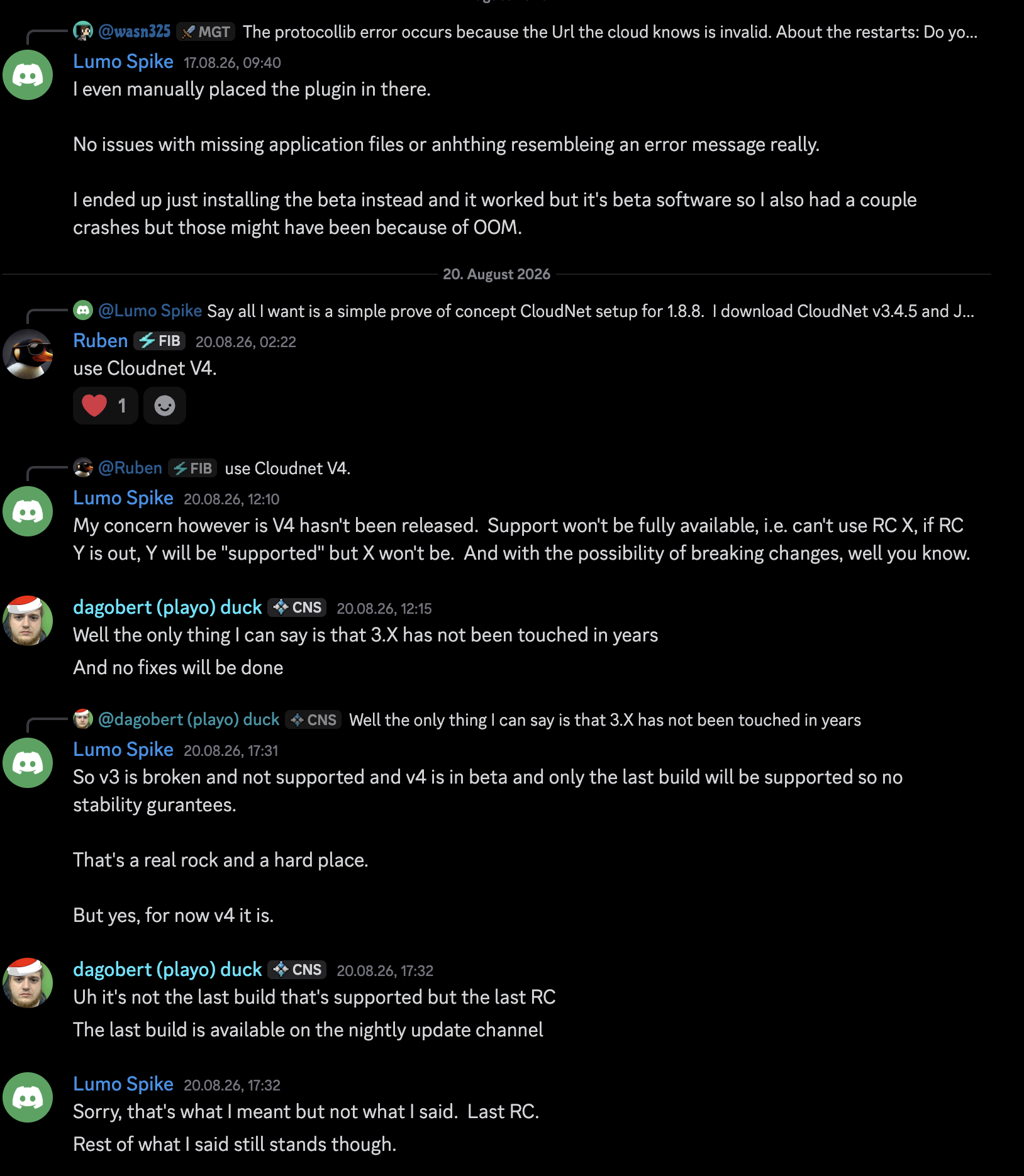
On 6 August 2026, a CloudNet team member confirmed that all v3 releases are end-of-life and recommended v4. The supported option is the latest v4 release candidate, a version still marked as a pre-release. v4 has used that label since August 2022, including the current RC17.

Support for new Minecraft versions can also take time. Minecraft 26.1 arrived on 24 March 2026. CloudNet's release announcing 26.x support followed on 9 August, more than four months later. These dates compare published releases. Development builds and individual modules may have worked sooner.

Read the CloudNet team statements

"Well the only thing I can say is that 3.X has not been touched in years

And no fixes will be done"

CloudNet team member

Discord ·

Later in the conversation, the team member clarified that support covers the latest release candidate. The newest development builds are available through the nightly update channel.

Original Discord messageView the full screenshot

"3.4.5 or generally any 3.X version is end-of-life and we suggest using v4 instead."

CloudNet team member

GitHub ·

Original GitHub comment

The experience matters to us

Clear documentation and communication matter to us, and we know we don't always get them right. Keeping guides current and explaining changes well is ongoing work for us.

Our aim is to make it easier to understand how to get started, what works today, what is still planned and what changes mean for your network. When our information leaves you guessing, we have more work to do.

If something is missing or unclear, talk to us. We want to understand where you got stuck and make that experience better.
About this comparison

Written by the SimpleCloud team and reviewed on 20 September 2026. Based on SimpleCloud's current code and documentation, and CloudNet v4 4.0.0-RC17. CloudNet descriptions cover the reviewed release and the modules named above. Other extensions may add features. Found an error? Send us a correction.

Try SimpleCloud

Create a network, connect a machine and start your first server.

Also comparing Pterodactyl?

We use anonymous analytics to make SimpleCloud better. No ads, no tracking across sites.